Entry · Ref A9QB3NBG
What employees should think about before sharing business data with AI tools
- Posted
- 2026-11-18
- Last amended
- 2026-11-18
- Account
- @practicalainotes
Start with the direct answer
Employees should treat any business information they put into an AI tool the same way they would treat it if they were copying it into an email to a stranger. That means checking what the data contains, who might see it later, and whether the tool has permission to store or reuse it. The safest approach is to share only what is strictly necessary for the task and to leave out names, account numbers, internal project codenames, and anything marked confidential. If the tool runs on a public server, the data leaves your organisation’s control. If the tool uses your input to train or improve its model, that information could reappear in someone else’s answer later. A good rule of thumb is to ask: would I be comfortable if this exact text appeared on the front page of the company intranet? If the answer is no, the data does not belong in the prompt.
Why this matters for responsible AI training
Responsible AI training is not just about the people who build models. It is equally about the people who use them day to day. When an employee types a question or pastes a document into a chat interface, they are taking part in a chain of data handling that the organisation may not fully control. The same principles that guide ethical model development - data privacy, bias awareness, human oversight - apply to the use side as well. A tool that is perfectly safe for general research questions can become a liability when it receives payroll spreadsheets or customer lists. Understanding where those boundaries lie is what responsible AI training covers in practice.
What counts as sensitive information
Sensitive information goes beyond obvious categories like credit card numbers or medical records. It includes internal financial projections, hiring criteria, performance reviews, legal correspondence, intellectual property under development, and business strategy documents. Even aggregated data can be risky if someone could reverse-engineer individual records from it. Employees who work with such material every day may not realise how much context they are revealing when they ask an AI tool to summarise a quarterly report or draft a reply to a supplier. The tool does not need to know the company’s full product roadmap to help write a polite email.
Examples of what to avoid
- Customer personally identifiable information (PII) such as names, addresses, and identification numbers
- Employee records including salary bands, performance notes, and disciplinary actions
- Internal system credentials, API keys, or database connection strings
- Unpublished research, patent filings, or trade secrets
- Board meeting minutes or draft legal documents
These categories are not exhaustive. The key is to develop a habit of checking what the input contains before pressing send. A quick mental scan takes seconds and can prevent a breach that costs far more time to fix.
How data flows once you hit enter
When you submit information to a cloud-based AI service, that data travels over the internet to the provider’s servers. Depending on the service’s terms, the data may be logged, reviewed by human moderators, or used to retrain the underlying model. Some providers offer enterprise plans that promise not to use customer inputs for training, but those guarantees are contractual, not technical. Even with a strong contract, data stored on a third-party server is subject to that provider’s security posture, which your organisation cannot fully audit. The safest data is data that never leaves your own environment. For many teams, that means using on-premise or self-hosted models for the most sensitive work.
The role of access controls
Access control is a topic that often gets overlooked in the rush to adopt new tools. Employees may assume that because they can reach a web interface, they are authorised to use it with any company data. That assumption can be dangerous. Organisations should define who is allowed to use which AI tools and for what purposes. A junior staff member in marketing may have a very different risk profile from a senior engineer working on a prototype. Responsible AI training should cover these distinctions and give employees clear guidance on escalation. If someone is unsure whether a piece of data is safe to share, there should be a named person or a documented process they can consult.
Bias and output monitoring
Bias in AI outputs is not only a problem for developers. It also appears in everyday use when employees accept a tool’s answer without question. A model trained on publicly available text may reproduce stereotypes, favour certain demographics, or make assumptions that do not fit the local context. For a Singapore-based workforce that operates across multiple cultures and languages, these biases can be especially visible. Employees should be trained to read outputs critically, to spot when an answer seems off or unfair, and to escalate those cases. Output monitoring is a shared responsibility. The person who receives a biased result is often the only one who can catch it before it reaches a customer or a colleague.
Human oversight is not optional
AI tools are good at generating plausible text, but they are not good at judging whether that text is appropriate for a given audience. A tool might draft a response that sounds confident but contains a factual error, or it might use language that works in one country but causes offence in another. Human oversight means reading the output, thinking about it, and editing it before it goes anywhere. That step is not a formality. It is the main safeguard against the tool’s limitations. Responsible AI training should emphasise that the tool is an assistant, not a decision-maker. The final call always belongs to a person who understands the context.
Practical steps for everyday use
A practical approach is to build a short mental checklist that becomes automatic. Before pasting anything into an AI tool, ask: does this contain personal data? Does it reveal something my company has not announced publicly? Could someone with a different role in the organisation use this information to gain an advantage? If the answer to any of these is yes, strip out the sensitive parts first. Replace names with placeholders, remove exact figures, and paraphrase internal jargon. The tool can still help with structure or tone without needing the full context.
For example, instead of asking the tool to rewrite an email that contains a customer’s name and order number, remove those details and ask for a rewrite of the general message. The result will be just as useful and much safer. Over time, this habit becomes second nature.
How training fits into the bigger picture
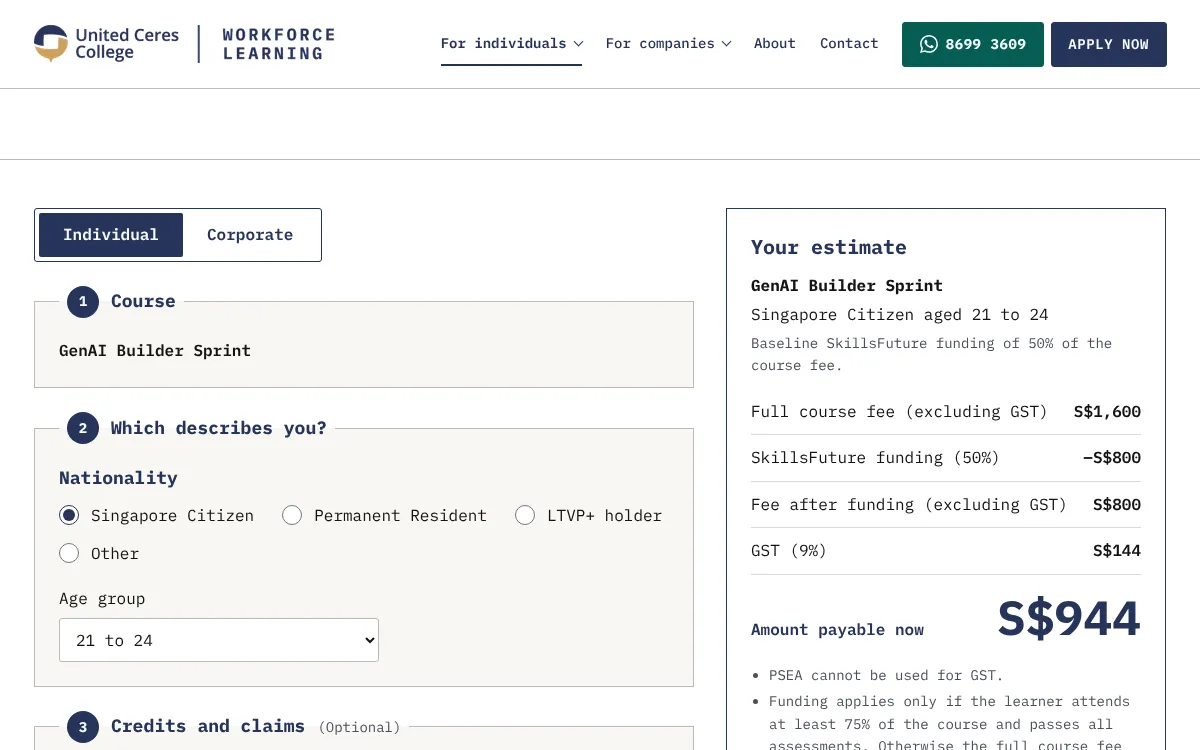
Courses like the one offered at workforcelearning.unitedceres.edu.sg address these exact concerns by placing responsible AI training at the centre of the learning experience. Participants learn not just how to build a generative AI application but also how to evaluate the risks that come with deploying it in a real work environment. The two-day format covers data privacy, bias, access control, and output monitoring in a hands-on way that connects directly to the daily decisions employees make. A professional who completes that kind of training is better prepared to handle the grey areas that policies cannot cover.
What to do when the rules are unclear
Policies often lag behind technology. An employee may find themselves in a situation where the company has no official stance on a particular AI tool or use case. In that situation, the safest course is to err on the side of caution. Use the tool only with data that is already public or that the organisation has explicitly designated as low-risk. Flag the gap to a manager or the IT security team so they can develop guidance. Acting as a responsible user means not waiting for permission when the risk is obvious, but also not assuming that silence equals approval.
Organisations that invest in responsible AI training create a culture where employees feel empowered to ask questions and raise concerns. That culture reduces the chance of a costly mistake and builds trust in the tools the company adopts. The goal is not to scare people away from AI but to give them the judgment to use it well.
For teams looking to build that capability in-house, structured programmes such as the one at workforcelearning.unitedceres.edu.sg provide a practical starting point. They combine technical skill-building with the ethical and operational awareness that makes AI use sustainable. An employee who understands both the power and the limits of these tools is an asset to any organisation.
Staying updated as the field changes
The landscape around AI tools shifts quickly. A service that was safe to use last month may have changed its privacy policy or added new features that affect data handling. Employees should revisit the terms of service periodically and stay alert to announcements from their own IT department. Responsible AI training is not a one-time event. It is a practice that evolves alongside the technology. The same critical thinking that helps someone decide what to share today will help them adapt to whatever comes next.